Skip to content

Smart academy platform

Academy management, masterfully built.

ClassHub connects your front desk, director, teachers and parents on one set of data and permissions, built on current technology. Fast and secure on PCs, phones and tablets.

  • Desk web

    PC and tablet browsers

    Check-ins, attendance, inquiries and schedules on one screen

  • Teacher app

    iPhone · iPad · Android phones and tablets

    Attendance, homework and assessments for your own classes, right in class

  • Parent app

    iPhone · iPad · Android phones and tablets

    Absence notices, homework, test results, class notes and the school bus in one place

  • Director app

    iPhone · iPad · Android · PC

    Today's exceptions and approvals first

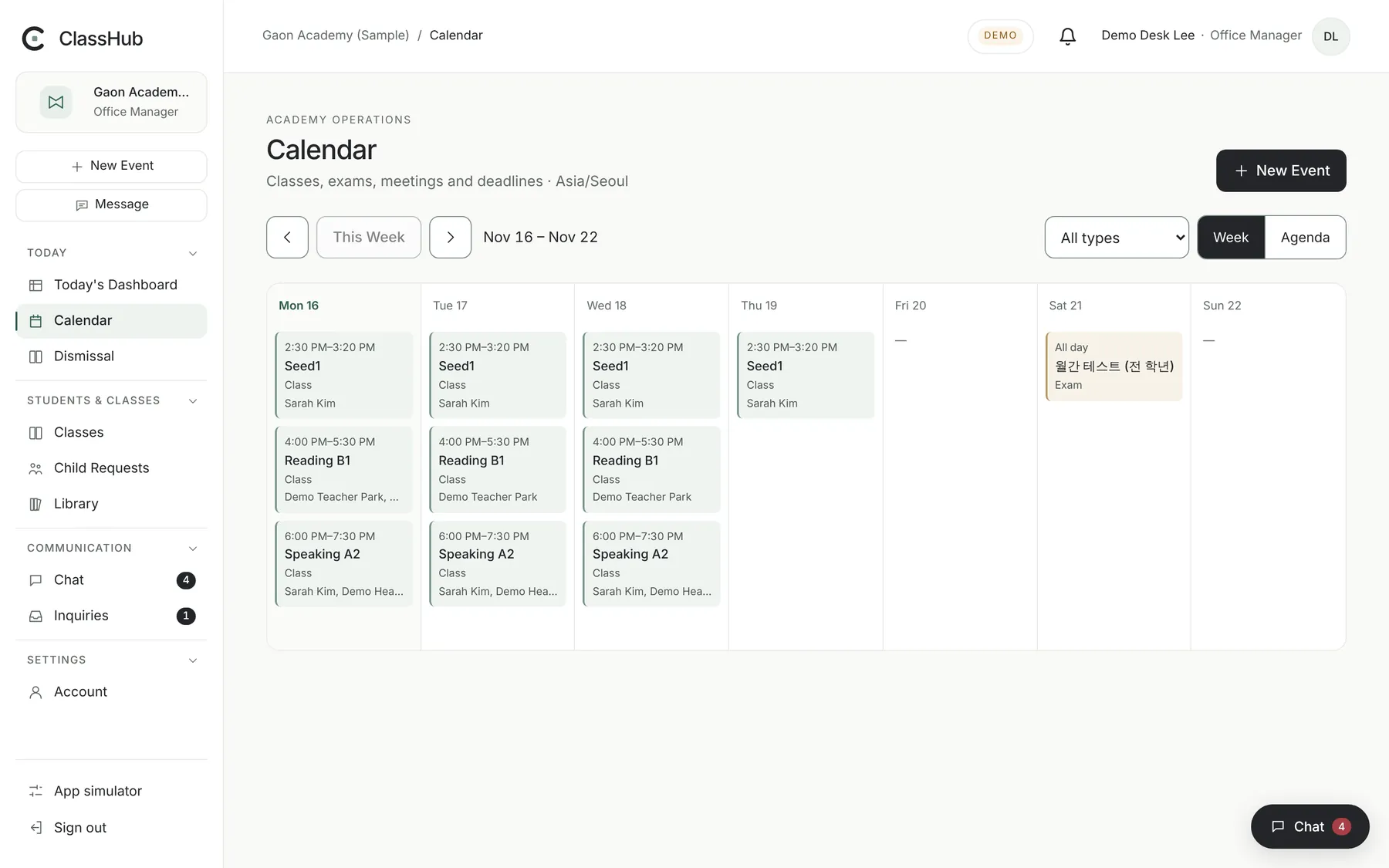
Desk web calendar: this week's classes and an exam
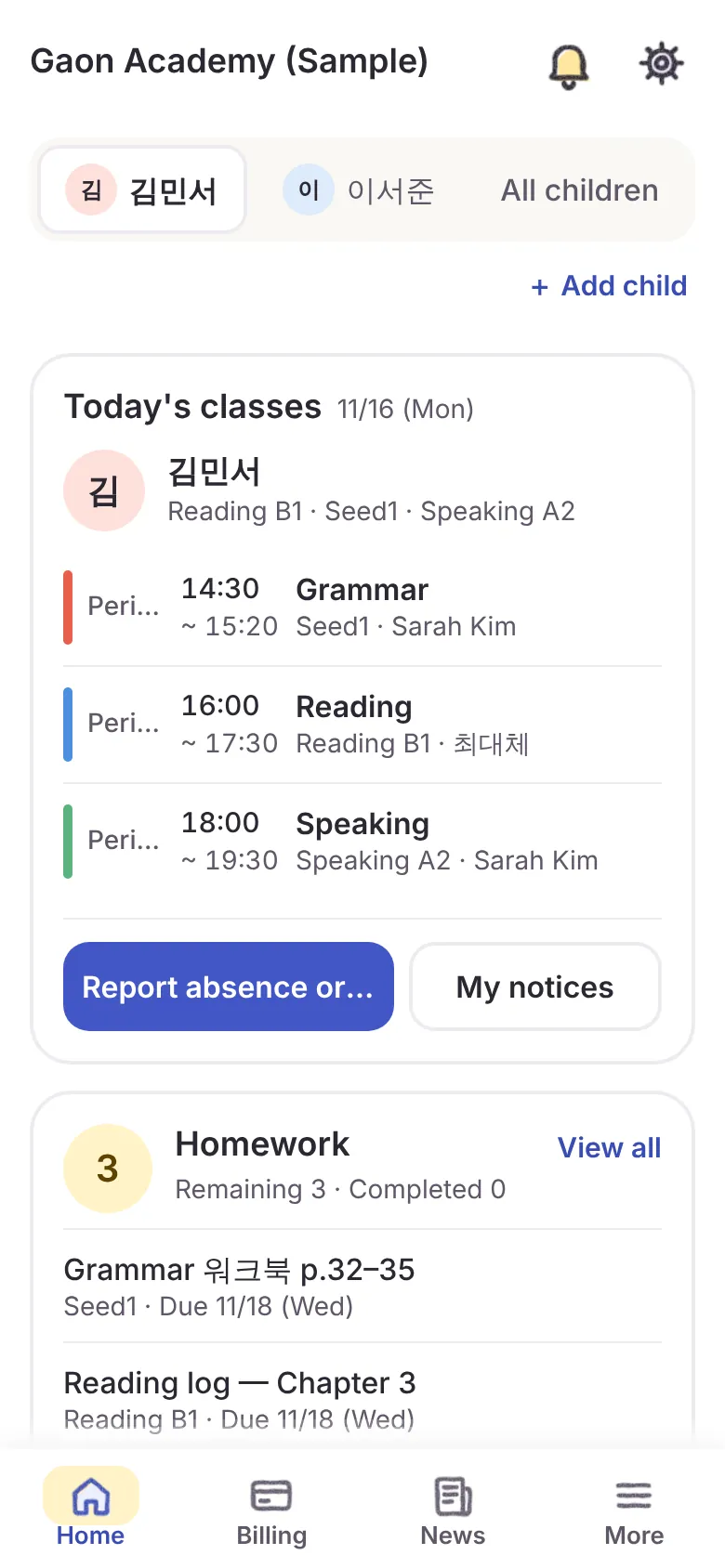
Parent app home: today's classes and the absence notice button
Actual product screens · fictional sample data

Why ClassHub

Fast, secure, everywhere.

  • Modern and fast

    Lightweight screens built on current web and mobile technology. If the connection drops, the teacher app keeps attendance on the device and sends it once it is back online.

  • Security by design

    Separate data per academy, role-based permissions, encrypted personal data and an audit trail of changes — enforced on the server and in the database.

  • Staff messenger built in

    Channels, direct messages, files, notifications and tasks for your staff, so day-to-day work stays in ClassHub instead of an outside chat app.

  • On every device

    Runs in PC browsers and on iPhone, iPad and Android phones and tablets. The teacher, parent and director apps are being prepared for the App Store and Google Play.

For every role

One record, the right view for each role.

Attendance and homework recorded once appear on teacher, desk, director and parent screens — each within its own permissions.

Director app · web

Directors

See what needs your attention today before the numbers.

  • Unrecorded attendance, overdue inquiries and reports awaiting approval on the home screen
  • Invite teachers, assign classes and manage role-based permissions yourself
  • Turn on only the modules you need and set your academy logo and name
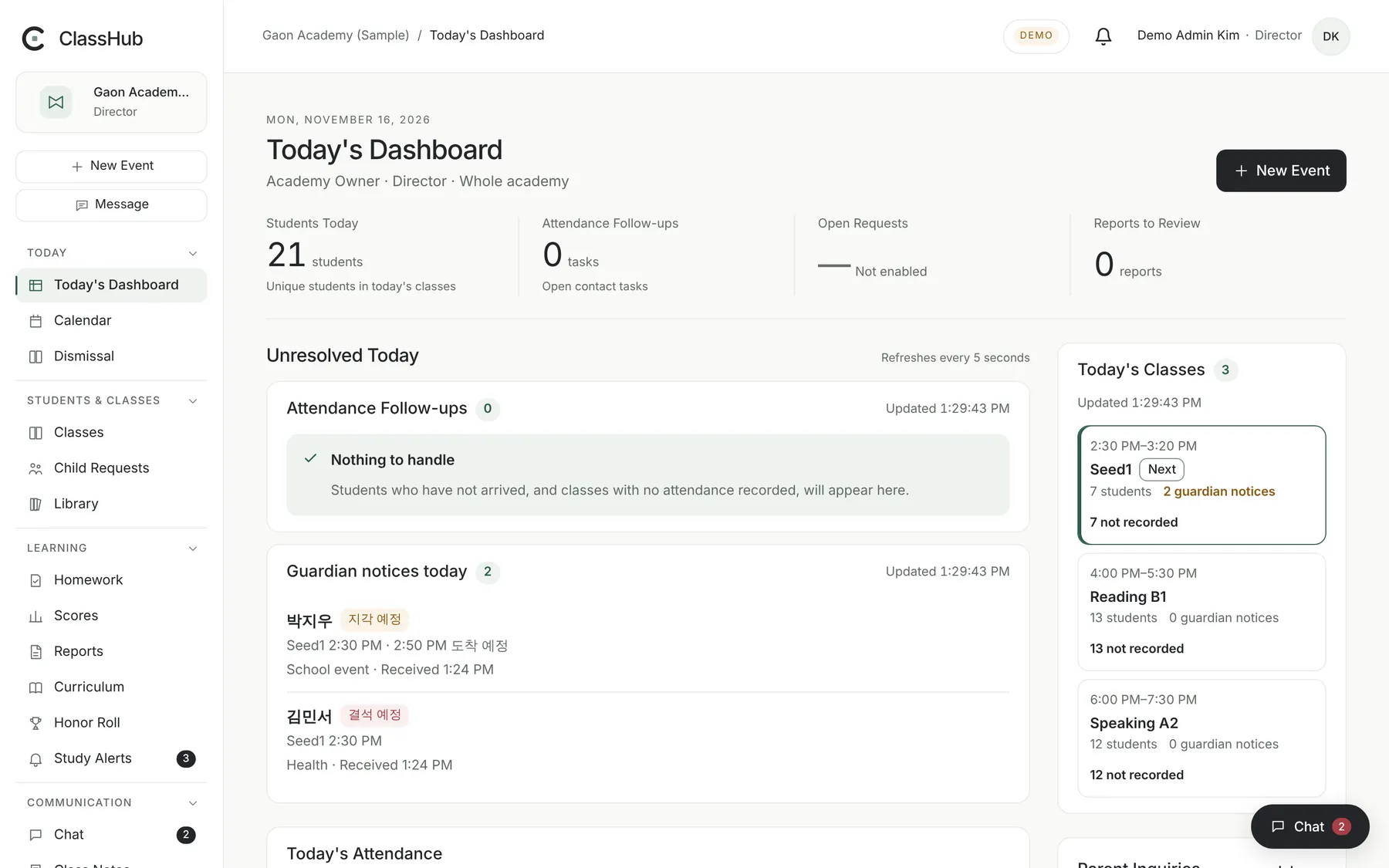
Director's Today's Dashboard: today's classes, parent absence and late notices, unrecorded attendance

Desk web

Front desk

Find and record things quickly, even with a parent on the phone.

  • Advance absence and late notices from parents, kept apart from actual attendance
  • Students who have not arrived move to a follow-up list automatically
  • Assign inquiries, check schedule and room conflicts, lend and return library books
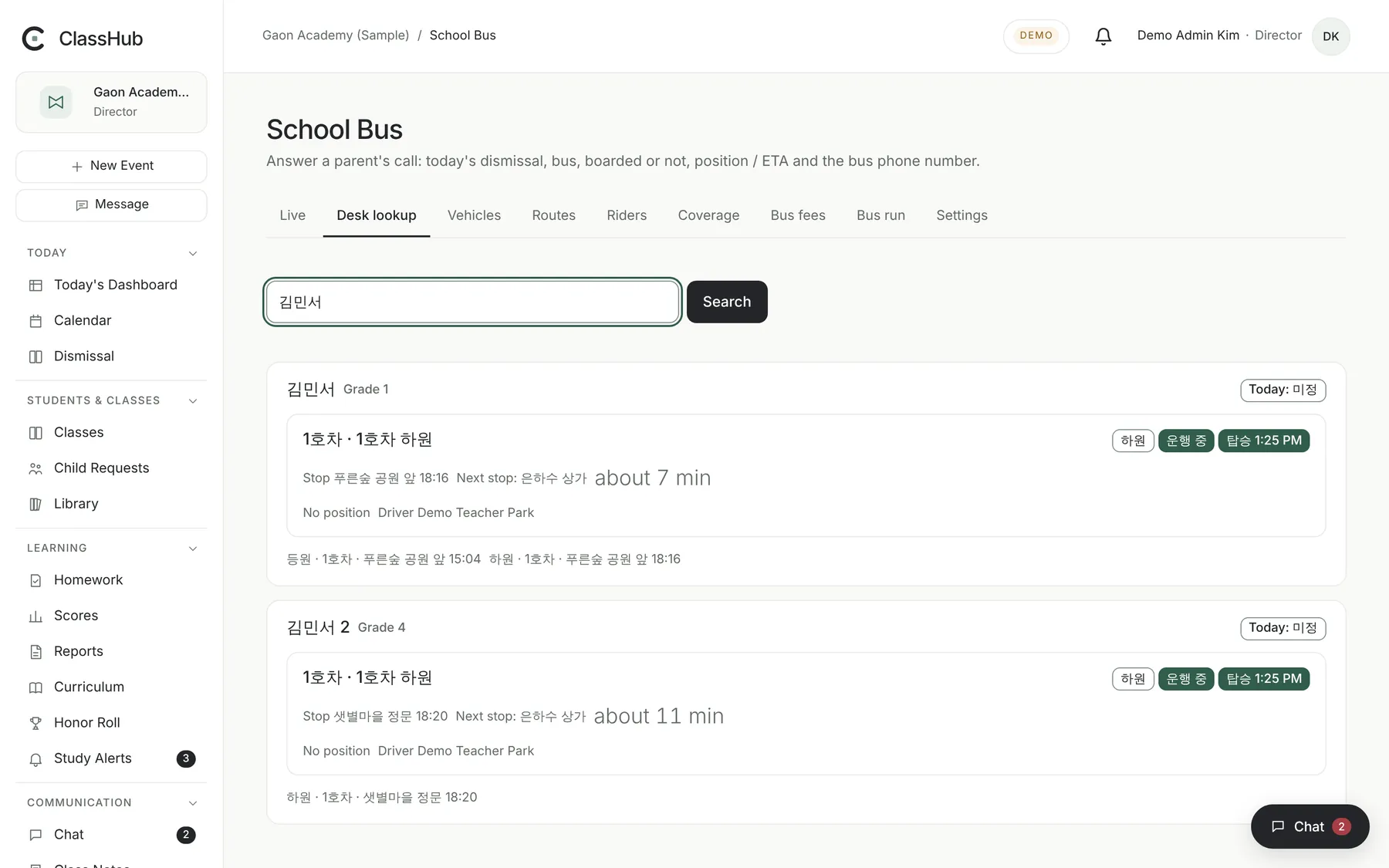
  • With the school bus module: type a student's name to see today's bus, boarding status and expected arrival
Desk web school bus lookup: a student's bus, boarding status and stop progress for today

Teacher app

Teachers

Only your assigned classes and their students.

  • Record attendance, homework, quick assessments and progress together in class mode
  • Send class notes and homework to a class or selected students and see who read them
  • Exchange absence cards and must-read announcements in the staff messenger
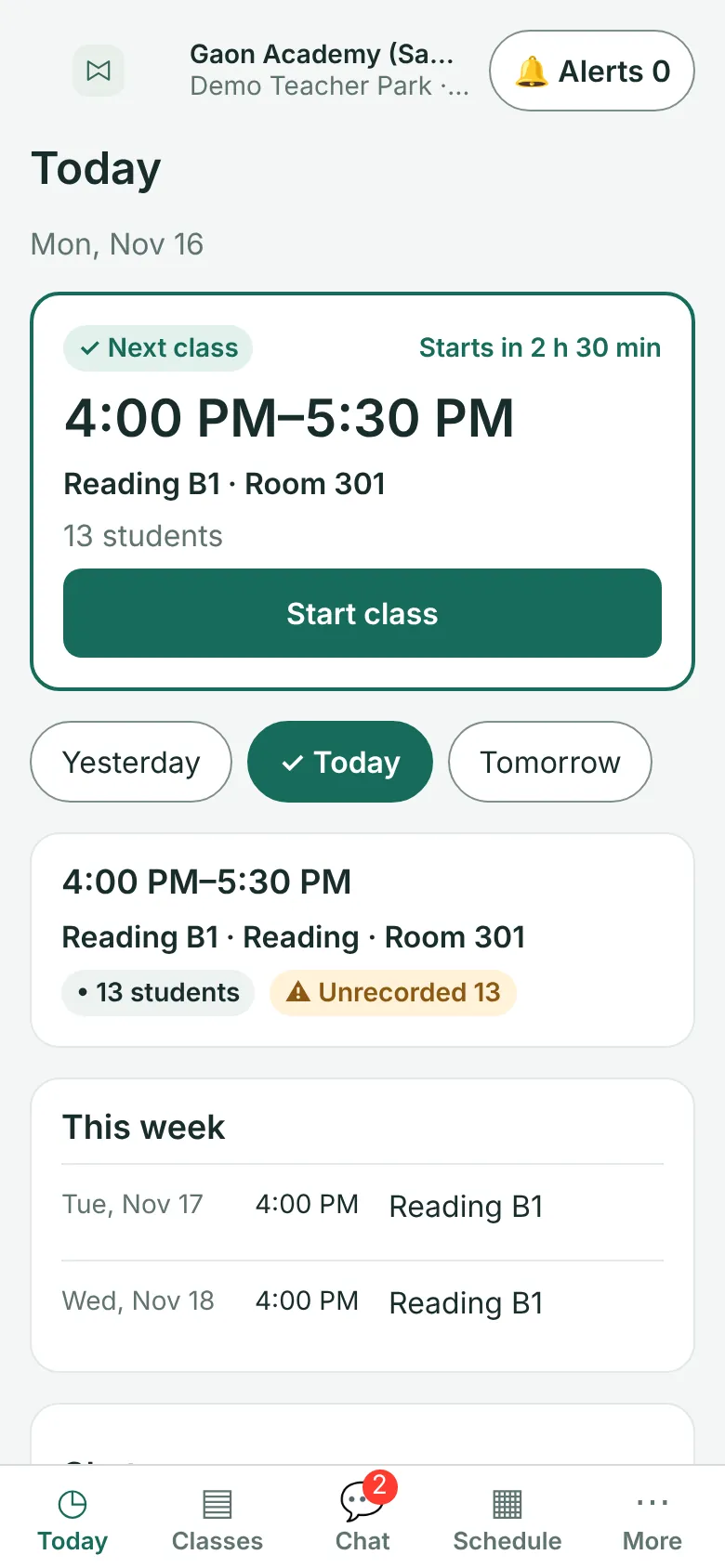
Teacher app Today screen: next class and unrecorded attendance

Parent app

Parents

Only what teachers have checked and shared.

  • Send absence and late notices in advance and follow their status
  • Homework, test results, published report cards, class notes and academy notices
  • Ask a teacher and read the reply in one thread
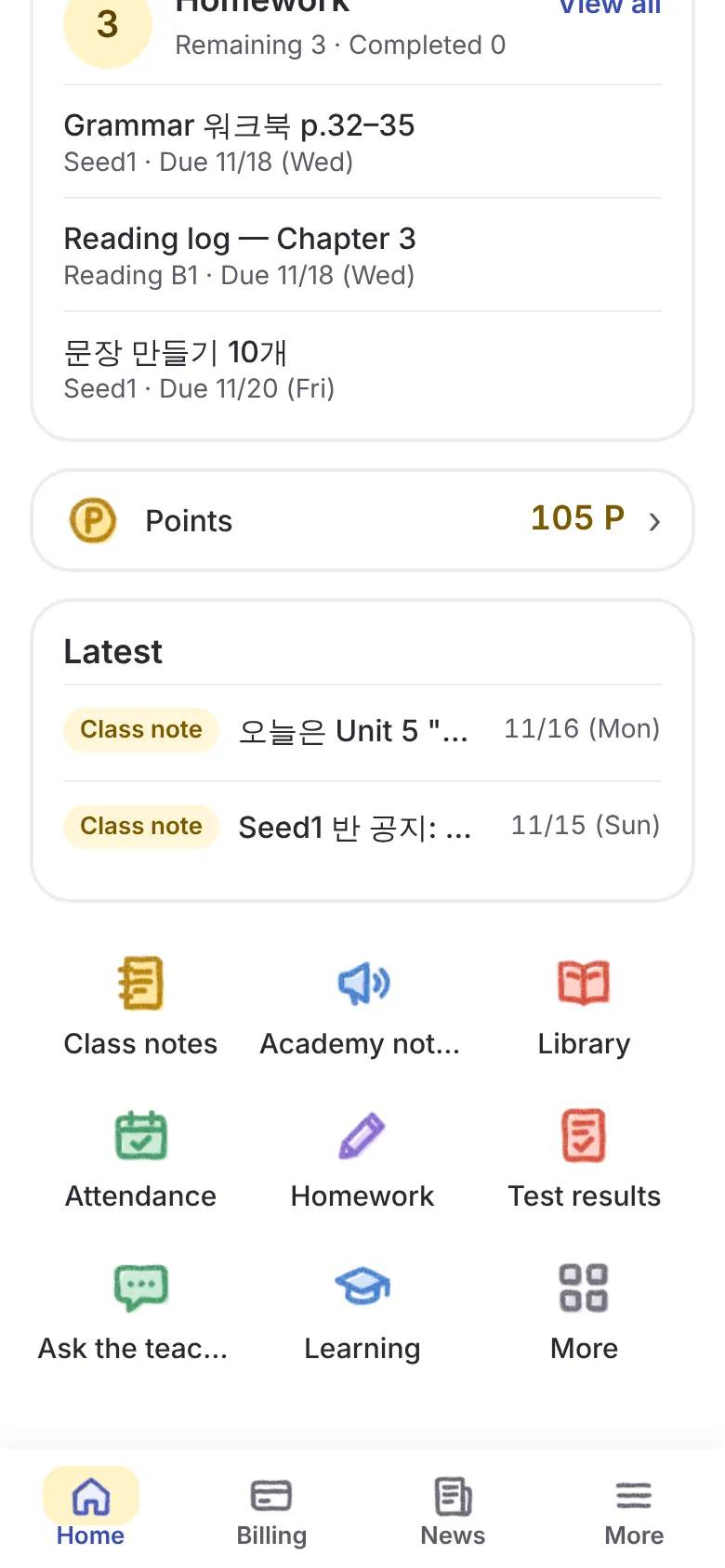
Parent app home: homework, points, latest news and the menu for class notes, notices, attendance, homework, test results and questions

Features

What your academy needs every day

See all features

Attendance Available

Record present, late, absent and early leave per class. Parents' advance absence and late notices are shown separately from actual attendance, and students who have not arrived go to a follow-up list.

Homework and test scope Available

Post homework and test scope per class. Parents can mark "done / not yet" at home, and teachers see that while recording submitted or missing for each student. The teacher's record is the official one, and parents only see statuses the teacher has shared.

Test results Available

Your academy sets area weights and grade bands. Absent, exempt and ungraded are kept distinct from a score of 0, and score changes and retests are recorded separately.

Report cards Available

Drafts are built from scores, then reviewed, approved and published. A published report never changes; a correction is published as a new version.

Class notes and notices Available

Send class notes to a class or selected students and see read receipts. Schedule academy notices and news for a branch or class.

Inquiries and consultations Available

Track parent inquiries by owner, due date and status. Internal notes are never shown to parents, and call requests are booked on the staff calendar.

Staff messenger Available

Staff-only channels and direct messages. Absence cards become real absence notices, and must-read announcements show who has confirmed.

Library Available

Check out, return and renew by barcode. Your academy sets loan periods and limits, and parents see their child's loans and due dates.

Camps Available

Set up vacation camp weeks, time slots, capacity, prices and discounts, and manage parent applications and payment records. Card payment becomes available once a payment provider contract is in place.

School bus Core available

Register vehicles such as Bus 1 and Bus 2, with stops per route (up to 15) and riders. Teachers mark which bus each student takes at dismissal, and the desk can look up a student's bus and expected arrival by name. A dedicated Android bus phone shares location only during a run, and parents see that bus only while their child is on board. Location sharing works only after the academy turns it on (off by default), and the map appears once a map service is connected.

KakaoTalk AlimTalk Integration pending

Sending requires your academy's Kakao business channel and approved message templates. Until then, messages go to the in-app inbox.

AI comments and consultation summaries Coming soon

Being designed to draft from lesson records, with only teacher-reviewed and approved text shared with parents.
Security and privacy

The right people, the right amount.

Permissions are decided on the server, not by the screen.

More on security

Separate data per academy

Every academy's data is stored separately. Server-side permission checks and database row-level security (RLS) work together so users of one academy cannot reach another academy's records.

Role-based permissions

The server decides what directors, managers, teachers and parents may do. Hiding a menu is never a substitute for a permission, and permission changes are recorded.

Class scope for teachers

Teachers view and record only their assigned classes and those students. Search, notifications and files follow the same scope, and saving is refused once an assignment ends.

What parents can see

Parents see only the shared records of children whose link has been verified. Internal notes, unreviewed scores and unapproved report cards never reach parent screens.

Modular

Start with only what you need.

Security and academy setup are always included; your academy chooses the rest. Modules that are off are blocked on the server, not just hidden from the menu.

See modules

Available now

  • Security and permissionsIncluded
  • Academy setup and supportIncluded
  • Students
  • Classes
  • Calendar
  • Attendance
  • Homework and progress
  • Textbooks and levels
  • Assessments
  • Report cards
  • Class notes and notices
  • Inquiries and consultations
  • Staff messenger
  • Staff management
  • Library
  • Points
  • Camps
  • School bus

Coming soon

  • AI assist
  • Admissions
  • Tuition billing
  • Payments
  • Online tests
  • Analytics
  • Phone integration

Getting started

Start small, one class at a time.

How onboarding works
  1. Get in touch

    Tell us the size of your academy and the features you need.

  2. Scope together

    We learn how you run things and agree on modules and timing.

  3. Set up your academy

    Bring over classes, teachers and students, and set your academy logo and name.

  4. Invite teachers and parents

    Teachers start once a class is assigned to them; parents start once their child link is verified.

  5. Pilot, then switch over

    Start with a few classes, check, then expand to the whole academy.

Frequently asked questions

More questions
How much does it cost?

Pricing plans are in preparation. We will walk you through pricing in an onboarding call once we know your academy size and the modules you need.

Which devices does it support?

The desk and directors use PC and tablet browsers; teachers, parents and directors use the apps on iPhone, iPad and Android phones and tablets. The apps are being prepared for the App Store and Google Play; until release we demo them as web previews.

Can we use only the features we need?

Yes. Security and academy setup are always included, and your academy turns on the rest. Modules that are off are blocked on the server, not just hidden from the menu.

Can teachers see every student?

No. Teachers see only their assigned classes and those students. Once an assignment ends, they can no longer view or save that class's records.

Considering ClassHub for your academy?

Tell us your academy size and the features you need, and we will put together the scope and timeline with you.

Contact us
ClassHub — academy management, masterfully built